
I wanted to put information on a small e-paper screen without changing its firmware whenever the message changed. A picture, a build result, or a quick drawing should be something I can send to it. Wireless Paper API gives a Heltec Wireless Paper board that interface: a browser canvas, an HTTP API, and a raw LoRa connection.
The board combines an ESP32-S3, a small black-and-white e-paper display, and an SX1262 radio. The firmware targets the Wireless Paper V1.1 panel, with a build option for the newer panel revision. The useful space is 250 by 122 pixels, so the project is about short messages and simple pictures. It does not turn the screen into a video display. The manufacturer's hardware description and panel revision notes matter when choosing the build.
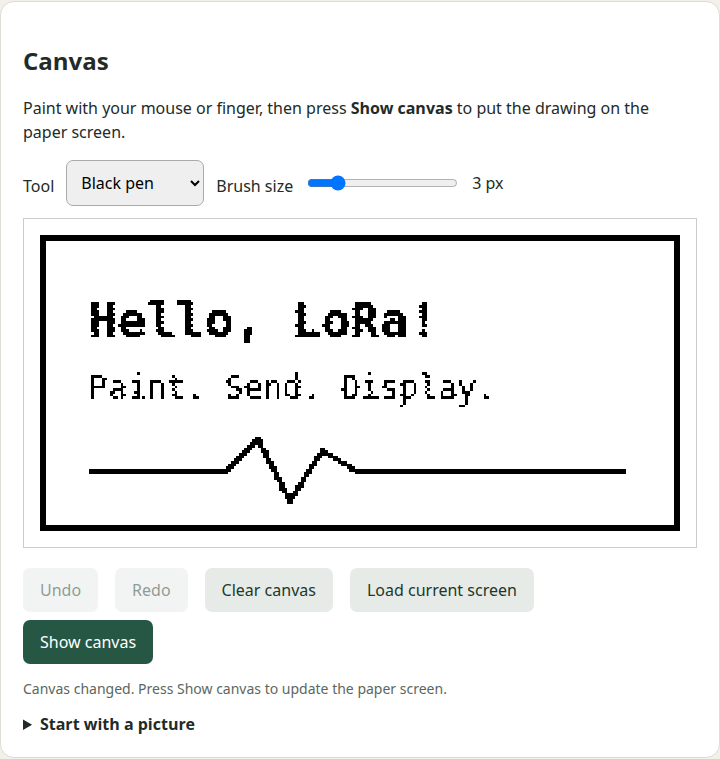
The browser does the work that would otherwise need a little graphics program on the computer. There is a canvas with a black pen, a white eraser, brush sizes, and undo and redo. I can draw with a mouse or finger, start from an imported picture, or load the last completed screen image. Pressing Show canvas sends the result to the paper screen. Editing the canvas alone does not keep refreshing the panel.
Picture conversion happens in the browser. It fits the image inside the display and converts it to black and white, using dithering where that helps. Text has separate controls for size, position, wrapping, ink, and background. A white heading on a black background is just a choice of settings, rather than another firmware example to compile.
A script can use the same display through HTTP on the normal port, 80. For example, replacing BOARD with the device address:
curl http://BOARD/api/display \
  -H 'Content-Type: application/json' \
  -d '{"text":"Build passed","size":2,"x":8,"y":8,
       "color":"white","background":"black"}'
The response contains a job number. The status endpoint tells the caller when the e-paper refresh has completed. There are also drawing operations and a full-frame bitmap endpoint. The reference is served by the board itself at /api, so it remains available when I am connected only to its hotspot.
Finding the screen again is part of making it useful. A saved Wi-Fi network may be unavailable, or I may no longer remember which network I configured. At startup, the e-paper screen shows the setup hotspot's name and the web address, http://192.168.4.1/. That gives someone standing next to the device a way in.
The default hotspot window is the first 60 minutes after startup. If a phone or laptop is still connected when the hour ends, the hotspot stays on until the last client disconnects. There is also an always-on option in the web interface, and that choice survives restarts. Restarting the board opens a fresh setup window. Its normal connection to a configured Wi-Fi network continues when the hotspot closes.
This is a small convenience, but it avoids needing to know a router's current address assignment before using the screen. When the board is on the local network, a hostname and the HTTP API provide another route. A router reservation is still the reliable way to guarantee a fixed LAN address.
The same board can bridge HTTP and raw LoRa in both directions. A program posts text or hexadecimal bytes to POST /api/lora/send, and the board transmits those bytes over its LoRa radio. Packets received from compatible LoRa devices are available through GET /api/lora/messages. The browser exposes the same sending and receiving controls, along with saved modem settings and signal measurements for received packets. Transmitting is disabled by default until the radio is configured and enabled.
This lets a computer or application use the board as its radio connection: HTTP requests become outgoing LoRa packets, and incoming LoRa packets can be read over HTTP. The screen is optional for that use. Another LoRa device needs matching modem settings and a compatible packet protocol. The implementation handles raw LoRa packets; it does not join a Meshtastic mesh or a LoRaWAN network. Those networks require their own protocol support, beyond sending bytes with a LoRa radio.
For a remote display running the same firmware, the Python helpers split display JSON or an image into numbered fragments. The receiver checks lengths and a checksum, and only submits a complete command to the screen. A full image is 3,904 bytes and takes 18 radio packets. That can be slow once airtime pacing is included. There is no acknowledgment proving that the other screen received an update, and a local successful transmit result is not a delivery receipt.
The power budget sets a limit on how available the device can be. The firmware runs the processor at 80 MHz, leaves the LED off, requests Wi-Fi modem power saving, and sleeps the display controller after a refresh. The setup hotspot can close when it is no longer being used. The station connection remains available for HTTP.
I have not measured battery current or battery life. Whole-device deep sleep would turn Wi-Fi off, so a normal HTTP request could not wake it. Keeping a hotspot or radio receiver available also costs power. The design keeps those tradeoffs visible instead of describing an always-reachable device as a microamp sleeper.
The public version contains placeholder configuration, not my Wi-Fi network or password. It builds without a credential file and starts its setup hotspot. A user who wants station Wi-Fi supplies an ignored local configuration file and rebuilds. A private firmware binary or flash dump can contain those credentials too, so those files do not belong in a public release.
The hotspot and HTTP API are deliberately open, and the raw LoRa protocol is unauthenticated. Nearby hotspot clients and reachable LAN clients can change the screen and settings. A checksum detects damaged fragments; it does not establish who sent them. This is a tool for a trusted local setup, not an internet-facing control service. The security notes spell out that boundary, including the need to match the antenna and radio band and follow the rules for the installation's location.
The checks cover actual display pixels, browser painting and erasing, undo and redo, image transfer, and the radio's configuration interface. The two hotspot settings were checked across restarts, with the boot screen updated each time. Native tests exercise the exact one-hour boundary, keeping the hotspot open for connected clients, fragment assembly, and malformed packets.
Those checks do not prove a completed hour-long hardware run, radio range, or over-the-air interoperability. A second compatible radio is needed for the air-link test. Valid RF transmissions were not part of the local adapter API checks. The project documentation keeps those limits separate from the parts that were exercised on the board.
What I wanted was a screen that a small program could use without learning its panel driver. A build monitor can send a result, a person can paint a note in the browser, and a radio experiment can use the same board as an adapter. The firmware handles the display and the connection details; the thing using it can stay small.