
Local LLMs come in a confusing array of file variants. The same model, say a 14-billion-parameter Mistral, will appear on a community quantizer's repository as mistral-14b-Q4_K_M.gguf, mistral-14b-Q5_K_S.gguf, mistral-14b-Q6_K.gguf, mistral-14b-IQ3_XXS.gguf, and a dozen others. They are all the same network of weights, compressed in different ways. The compression is what we call quantization, and the names tell you exactly what kind of compression was applied. Once you can read them, you stop guessing.
A neural network is a very long list of numbers. Those numbers are weights, and during training they were stored as 32-bit or 16-bit floating-point values. A 7-billion-parameter model in 16-bit is 14 GB of weights. A 70-billion-parameter model in 16-bit is 140 GB. Most consumer GPUs cannot hold either, and even system RAM struggles with the bigger ones. So we compress.
Quantization is a fancy word for "store each weight in fewer bits." If a weight that used 16 bits can be approximated with 4 bits, the file gets four times smaller. The model still runs; it just runs from a slightly less precise version of itself. The art is in choosing where to lose precision so that the loss does not break the model's behavior.
Pure 4-bit storage would be the simplest scheme: take every weight, pick the closest representable value out of 16 possibilities, store the index. That works, but it loses too much. Modern formats are smarter. They group weights into small blocks (typically 32 values per block), and within each block they store a shared scale factor and sometimes an offset. So instead of "this weight is the integer 5 out of 0..15," it is "this weight is 5 out of 0..15, multiplied by the block's scale of 0.0042, with the block's offset added." That tiny per-block calibration brings most of the precision back.
The letters in the names come from these methods. K means k-quants, the family of formats Iwan Kawrakow introduced into llama.cpp that uses these per-block scales (and a few other tricks) to get a much better quality-to-size ratio than naive bit truncation. I means importance-aware quantization, where the format spends more bits on weights the model relies on heavily and fewer bits on weights that contribute less. The model gets to keep its sharpness in the parts that matter.
The names follow a pattern. The first part is the storage scheme, the second part is the bit count, and the suffix is the size variant. Let me break down the most common ones you will actually see.
Q2_K, Q3_K, Q4_K, Q5_K, Q6_K, Q8_K: k-quant formats at 2, 3, 4, 5, 6, and 8 bits per weight. Higher number means more bits per weight, which means larger file and better quality. Q8_K is essentially indistinguishable from the original 16-bit file. Q2_K is heavily compressed and noticeably worse.
The suffix _S, _M, or _L is the size variant within a bit budget. They control how the format spreads its bit budget across different parts of the model. _S is the smallest and most aggressive. _L is the largest and most generous. _M sits in the middle.
IQ1_S, IQ2_XS, IQ2_XXS, IQ2_S, IQ3_XXS, IQ3_XS, IQ3_S, IQ3_M, IQ4_XS, IQ4_NL: importance-aware variants. Same reading: number is bits per weight, suffix is size variant. The XXS and XS sizes are aggressive low-bit settings that only became practical because of the importance-awareness; without it, sub-3-bit quantization would have been unusable for most models.
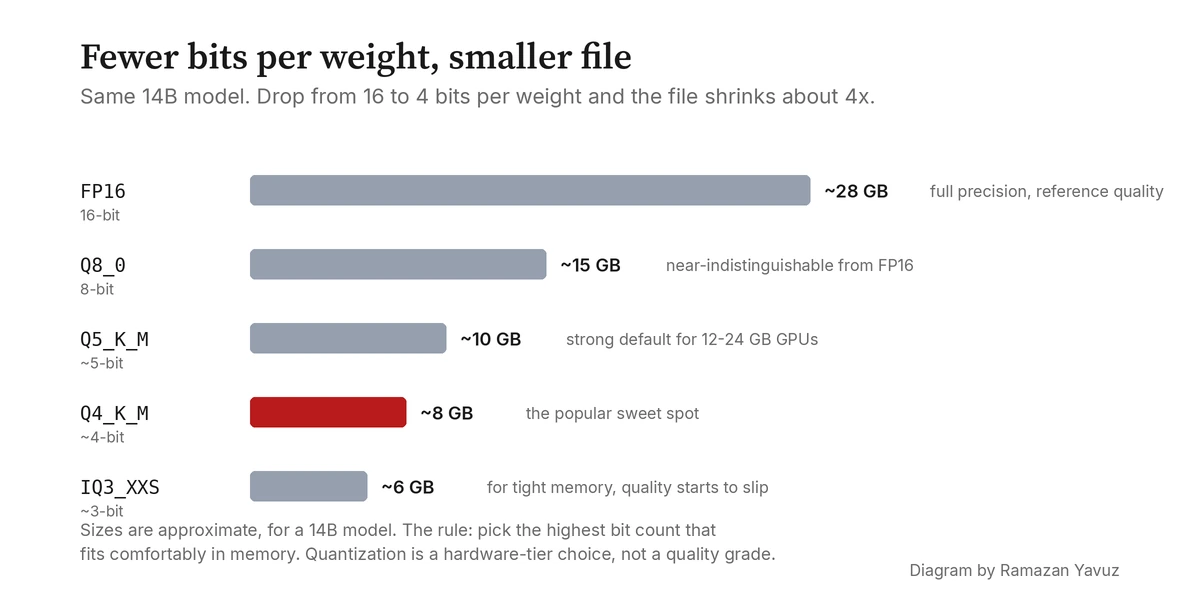
A model with fourteen billion parameters gives you a feel for the trade. In F16 (the original 16-bit format) it is about 28 GB on disk and the same in memory. In Q8_K it shrinks to roughly 15 GB with quality loss you cannot measure on most benchmarks. In Q6_K it is around 11 GB with quality loss you cannot measure in conversation. In Q4_K_M it is about 8.5 GB; this is the sweet spot most people land on for consumer GPUs, and it is the one I default to in hydra-llm's tier configuration. Quality loss is small but starts to be measurable on hard prompts.
Below that, things degrade faster. Q3_K_M is around 6.5 GB but the model becomes more confused on long, structured tasks. Q2_K is around 5 GB and starts producing visibly worse outputs. IQ3_XXS, despite being only about 5.5 GB, often outperforms Q3_K_S at the same size because its bit budget is allocated more cleverly. That is the single sentence summary of importance-aware quantization: smaller files at the same quality, or better quality at the same size.
Hardware decides what you can run. The first constraint is memory. The model must fit in your GPU's VRAM (or, if you do CPU-only inference, in system RAM with some headroom for the OS). If your GPU has 12 GB of VRAM and the model file is 14 GB, you cannot load it; you have to drop to a smaller quantization or split it across CPU and GPU, which slows it down a lot.
The second constraint is bandwidth. Lower-bit quantizations read fewer bytes per weight, which means more weights get pulled per second. On bandwidth-bound hardware (which is most consumer GPUs and almost all integrated GPUs) lower-bit quantizations actually run faster, not just smaller. A Q4_K_M often produces tokens 1.5 to 2 times faster than the same model in Q8_K, because the GPU is just shuffling less data around.
I treat quantization as a hardware-tier decision. Pick the highest bit count that fits comfortably in memory and gives you tolerable speed; that is your sweet spot. For most modern consumer GPUs with 12 to 24 GB, Q4_K_M through Q6_K is the practical band. For machines with very tight memory budgets, the IQ formats give you a smarter way down.
A few common labels, condensed into a table for quick reference. Sizes shown are approximate for a 14-billion-parameter model.
| Name | Bits/weight | Approx. size (14B) | Use when |
|---|---|---|---|
F16 / BF16 | 16 | ~28 GB | You have the memory and want the original. |
Q8_K | 8 | ~15 GB | You want effectively-original quality at half size. |
Q6_K | 6 | ~11 GB | Excellent quality, easy fit on 16 GB cards. |
Q5_K_M | 5 | ~9.5 GB | Slightly safer than Q4_K_M when you have headroom. |
Q4_K_M | 4 | ~8.5 GB | The default sweet spot for 12–16 GB cards. |
Q4_K_S | 4 | ~7.5 GB | One step smaller than Q4_K_M, slightly more quality loss. |
Q3_K_M | 3 | ~6.5 GB | Last resort on tight memory. |
IQ4_XS | ~4.25 | ~7.7 GB | Like Q4_K_M but smaller at similar quality. |
IQ3_XXS | ~3.06 | ~5.5 GB | Very small with surprisingly usable quality. |
IQ2_XXS | ~2.06 | ~4 GB | Heroic compression. Quality drops; useful for huge models on tiny VRAM. |
For other model sizes the numbers scale roughly linearly: a 7B model in Q4_K_M is around 4.5 GB, a 32B in Q4_K_M is around 19 GB, a 70B is around 42 GB. The fastest way to a useful estimate is "model parameters in billions, divided by 2, gives you the Q4_K_M file size in GB" with a small fudge factor.
A practical rule of thumb to close on. Pick the highest bit count that leaves you a comfortable memory cushion (a couple of GB above the file size for KV cache and overhead). On a 16 GB GPU running a 14B model, that means Q5_K_M or Q6_K. On a 12 GB GPU, that means Q4_K_M. On 8 GB, drop to IQ3 or IQ4_XS and accept some quality cost. If you are CPU-only, use Q4_K_M or smaller because token generation is bandwidth-bound and lower bit counts mean fewer bytes to read per token.
Quantization gives you a hardware trade-off rather than a universal quality grade. The same Q4_K_M file can be perfect for your hardware and task, wasteful, or insufficient. The useful setting is the one that matches your available memory and required speed. Once you can read the names, you can often pick it on the first try instead of downloading three files to find out.